
01
Profiles for every family member
A separate profile for each person: relationship, birthday, avatar, and a personal theme color. Allergies, blood type, and emergency notes come first, visible at a glance during a visit.
Chronic condition profiles, daily measurements, medications, and visits. No account needed and no server connection — everything is written only to this iPhone.
Most health apps sync your data to the cloud. Kin Health takes the opposite direction: nothing collected, nothing uploaded, nothing analyzed — not even a channel left open to transmit data.
Read the full privacy policyAll data (members, conditions, records, plans, photos, and activity logs) is kept only in the app sandbox on your device. The developer has no access.
From the first diagnosis, to morning-and-evening blood pressure readings, to the next follow-up visit reminder — scattered health details come together into one quiet, clear record.
A separate profile for each person: relationship, birthday, avatar, and a personal theme color. Allergies, blood type, and emergency notes come first, visible at a glance during a visit.
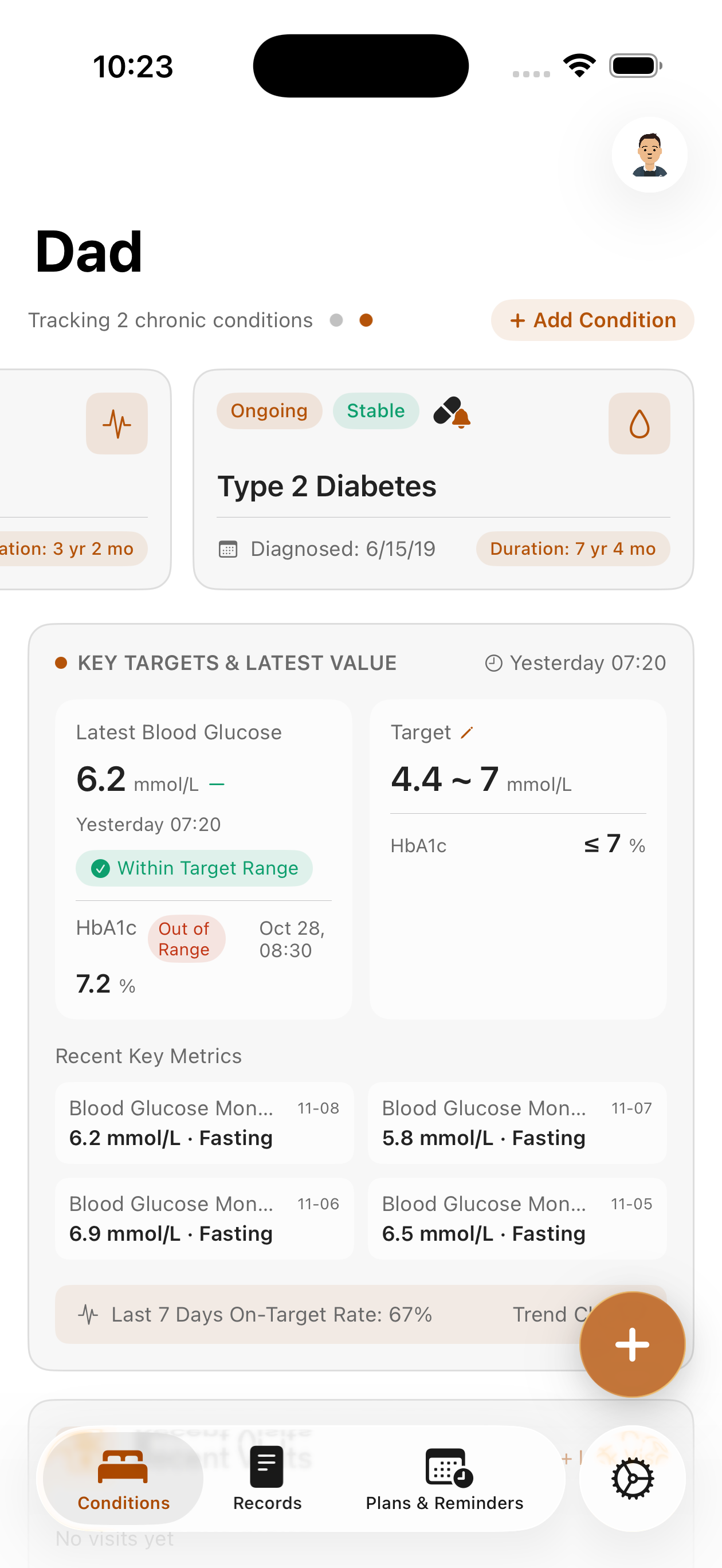
Hypertension, diabetes, hyperuricemia and more — monitoring metrics and target ranges preset from Chinese or US guidelines. Control rates and trend charts are summarized automatically.
Routine checkups, prenatal visits, symptoms, medications, rehabilitation, and follow-up visits — six record categories grouped by month, with filtering, search, and photo attachments.
Multiple reminder times, custom repeat rules, and end dates. Local notifications remind you on time, let you snooze, and make it easy to log a dose after the fact.
Export a single condition file as JSON and save it to Files or send it via AirDrop. Switching phones, backups, or handing records to a doctor — always your call.
Every change to members, records, and conditions is logged locally, so you can trace who changed what, and when.
No complex dashboards, no nagging red dots. Open the app and you see your family’s real health history.
Each member’s key metrics and control targets on one screen — see at a glance where things stand.
A timeline grouped by month — filter it and see what the past six months held.
What time to take medication today, which doctor next week — all in one list.
One profile for each of you — add them once, switch anytime, one place for the whole family.
Click any screenshot to zoom in
The free version is enough to start recording. Pro unlocks unlimited members and condition files by subscription, plus medication reminders, visit plans, and file export — made for the long work of caring for a family.
Actual plans, pricing, and trial periods are as shown on the App Store page.
Kin Health is a health records tool — it is not a medical device and does not provide diagnosis or medical advice. In an emergency, seek medical care immediately or call emergency services.
Check that iOS allows notifications in Settings → Notifications → Kin Health; make sure the plan is active and its bell is on; and confirm the “until” end date hasn’t passed. Reminders rely on system local notifications and may not fire when the device is off or the system clears notifications.
All data and photos are kept in the app sandbox on your device (SwiftData) and never pass through any server. The app uploads nothing, collects nothing, and has no channel to third-party analytics. iCloud Backup is performed by iOS itself; whether to enable it is up to you.
Enable iCloud Backup and restore the whole device, or export the condition file as JSON on the old device and import it on the new one via “Import condition file”. Uninstalling the app permanently deletes all local data — export backups regularly.
No. Deleting members, conditions, or records is permanent; the app asks for a second confirmation to reduce accidental deletion. Export important data first.
No. Preset metrics and target ranges for conditions come from public guidelines (China / US). They are references for recording and display only, not tailored to any individual, and do not constitute diagnosis, treatment, or medication advice. Always follow your doctor for health decisions.
The app’s theme color follows the current member’s theme setting. Switch members and the interface color changes with them, so you can tell at a glance whose record you are in.
Start today,
keep health in your own hands.